Fundamentals of Computing: Where Does the “Work” Happen in a Software System?
Understanding Compute, Servers, Clients, Memory, and Storage

Sandeep Varma

Why Understanding “Compute” Matters
Every time you interact with a software application—opening a website, tapping a button in a mobile app, or refreshing a dashboard—something is being computed somewhere.
As software systems grow in complexity and scale, understanding where computation happens becomes foundational to system design. It impacts performance, cost, scalability, and even user experience.
In this post, we’ll build an intuitive mental model for:
- What a server really is
- How servers differ from laptops (and how they’re similar)
- Where computation happens in frontend, API, and database layers
- The difference between memory and storage
This foundation will set us up for future topics like cloud computing and serverless architectures, which we’ll explore in upcoming posts.
Computation Is Everywhere
Any time you interact with a software system, there is some kind of computation happening behind the scenes.
Think of it like the human brain:
- It takes in input
- Performs some processing
- Produces meaningful output
Computers work the same way. They accept inputs, run calculations or logic, and produce outputs.
This is true whether you’re using:
- A laptop
- A phone
- A tablet
- Or even something as simple as a calculator
At a very fundamental level, a calculator is also a computer. It takes inputs, computes, and returns results.
So What Is a Server, Really?
If laptops and phones are computers, then what exactly is a server?
A server is just a computer—but a special kind.
It’s designed to:
- Stay on all the time
- Accept requests from many users simultaneously
- Respond very quickly
- Run reliably for long periods
A server usually doesn’t have:
- A screen
- A keyboard
- A mouse
- A visual user interface
Instead, it sits somewhere—often in a data center—connected to the internet, waiting to receive requests and respond to them.
Conceptually, a server is not magical.
It’s simply a computer running software written by developers, designed to respond to requests.
Why Not Just Use Laptops Instead of Servers?
This naturally raises a question:
If laptops are computers, why can’t we just use laptops to run software systems?
The answer lies in scale and concurrency.
When you’re building a real-world software application:
- Many users access it at the same time
- Requests arrive continuously
- Data needs to be processed quickly and reliably
A personal laptop:
- Has limited memory
- Limited ability to handle many simultaneous requests
- Is not designed for 24/7 uptime
Servers, on the other hand, are optimized for:
- Handling many concurrent requests
- Larger memory capacities
- Better networking
- Reliability and fault tolerance
It’s not always that servers are dramatically “faster” per core—it’s that they’re built for throughput, concurrency, and consistency.
APIs and Servers: Where Backend Compute Happens
Let’s make this concrete using an API example.
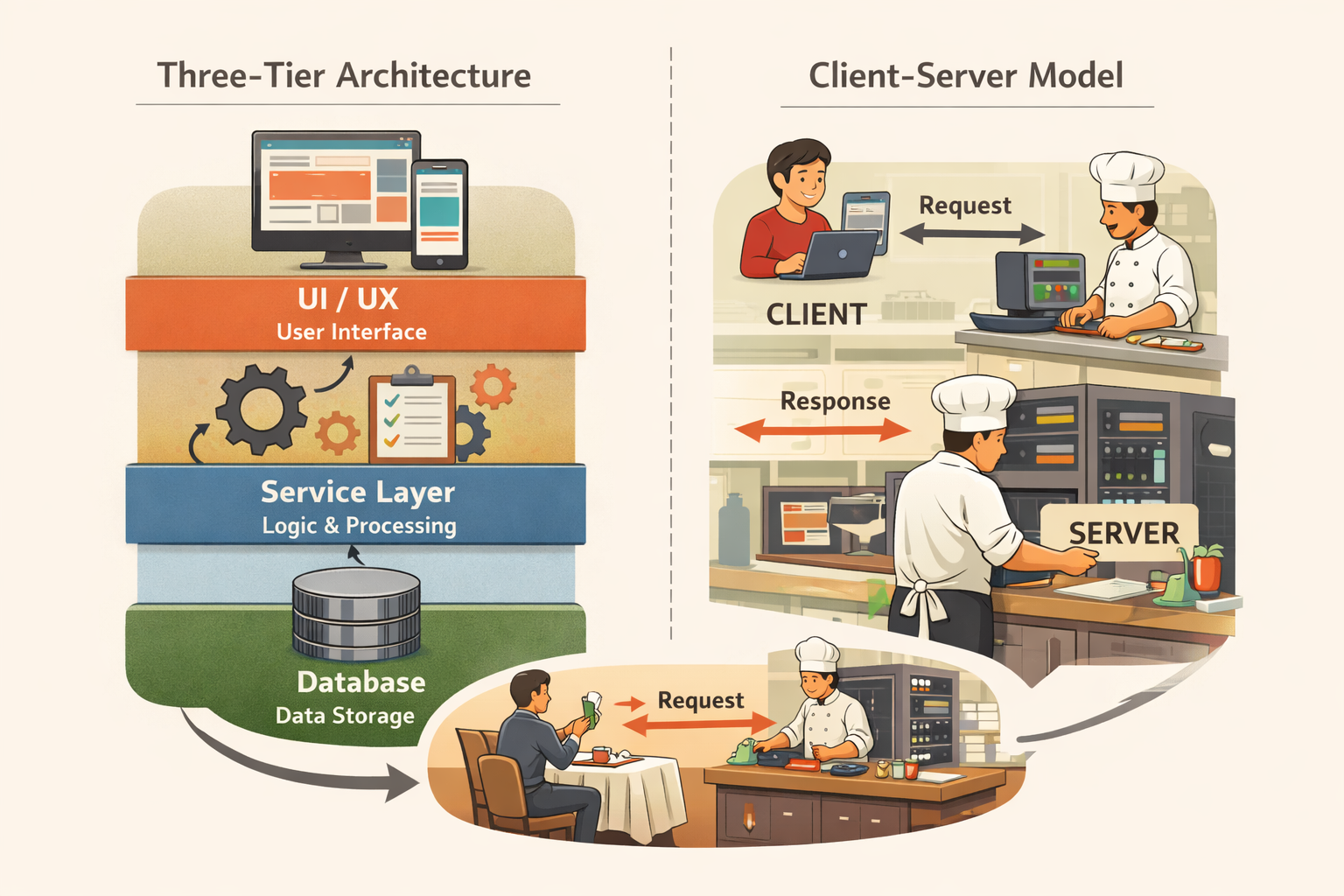
In a typical three-tier architecture (which we covered in Three-Tier Architecture and the Client-Server Model), you'll often have:
- A frontend (UI)
- An API layer
- A database
When you write an API, you define endpoints.
An endpoint is simply a specific address that accepts a request.
For example: https://www.example.com/api/customers
When someone sends a request to this endpoint:
- A computer somewhere receives it
- A program processes the request
- Data is returned, often in a structured format like JSON
There’s no UI here—just data.
For this to work:
- A computer must be running
- It must be connected to the internet
- It must be listening for requests
- It must respond in milliseconds
That computer is your API server.
An API server is a computer running your backend code, responding to requests from clients.
Databases Are Servers Too
Databases don’t live in some abstract void—they also run on computers.
A database server is just another specialized computer:
- Optimized for storing data
- Designed for fast reads and writes
- Focused on reliability and consistency
The reason we separate API servers from database servers is workload specialization:
- API servers focus on request handling and business logic
- Database servers focus on storage, indexing, and data retrieval
They’re both servers.
They’re just optimized for very different types of work.
Client-Side Compute vs Server-Side Compute
Now let’s shift to the frontend.
When you load a website or open a mobile app, not all computation happens on servers.
In fact, a lot of work happens on your own device.
Client-Side Compute
Client-side compute means:
- The computation happens on the device you’re using
- Your browser or mobile app renders the UI
- Animations, layout, and interactions are handled locally
This is why:
- Faster phones feel smoother
- Slower devices struggle with complex UIs
Your internet speed mostly affects how fast data arrives.
Your device’s computing power affects how fast the UI renders.
Server-Side Compute
Server-side compute means:
- The computation happens somewhere else
- You send a request
- The server processes it
- You receive data back
Understanding this distinction matters because it affects:
- Performance perception
- Infrastructure cost
- Scalability
- User experience across different devices
Storage vs Memory: Two Very Different Things
Two terms you’ll often hear in computing are storage and memory.
They sound similar, but they mean very different things.
Storage
Storage refers to:
- Disk space
- Permanent data
- Information that persists even after a restart
Examples:
- Hard drives
- SSDs
- Cloud storage
Storage answers the question:
How much data can I keep?
That’s why storage is measured in:
- Gigabytes (GB)
- Terabytes (TB)
Memory (RAM)
Memory, or RAM, is:
- Temporary
- Used during execution
- Limited in size
- Extremely fast
Think of memory like the human brain:
- You may have a lifetime of memories
- But at any given moment, you can only hold a few things in active focus
Or think of it like a kitchen:
- The pantry is storage
- The pan is memory
No matter how much food you have in the pantry, the size of the pan limits how much you can cook at once.
On servers, memory often becomes the limiting factor for:
- How many users can be served simultaneously
- How much data can be processed at once
Storage determines how much data you can keep.
Memory determines how much work you can do at a single moment.
Wrapping Up
At a foundational level:
- Servers are computers
- APIs are programs running on servers
- Databases are specialized servers
- Clients do their own computation
- Memory and storage solve very different problems
Once you understand where computation happens, many system design decisions start to make more sense.
In this follow up post named Serverless Functions: When Writing Just Code Is Enough, we’ll build on this foundation and explore what serverless computing really means—and why the term is often misunderstood, particularly as abstraction increases and responsibility shifts.
I’d love to hear your thoughts
How do you think about compute when designing or working with software systems?
- Do you consciously decide what runs on the client vs the server?
- Have you run into performance issues caused by memory or compute limits?
- Was there a moment when this mental model finally “clicked” for you?
Did you find this useful?
Comments
Loading comments...
Please log in to post a comment.
About the author

I write about leadership and software engineering through the lens of someone who’s worked as a software engineer, product owner, and engineering manager. With a Bachelor’s in Computer Science Engineering and an MBA in IT Strategy, I bring together deep technical foundations and strategic thinking. My work is for engineers and digital tech professionals who want to better understand how software systems work, how teams scale, and how to grow into thoughtful, effective leaders.
Continue reading
Why I Built This Blog Like a Software Product
How building my own site helped me stay technical without writing production code